
It’s hard to understand what you need to get started making websites even if you’re good with tech. When I first tried making a website, I tried many different ways, and I made a lot of mistakes by the time I had a website running. I finally figured out what I needed after several long talks with customer service from various companies. Nowadays, making a website, through every popular platform, is easy for me. I even managed to get a full time job as a web developer without any prior job experience or a college degree. I’m going to break all of this down for you from start to finish so you can make your own website without any issues.
Getting Started: The 2 types of websites made on builders
There are 2 types of websites that you can build without coding the whole thing from scratch. Even if you did know how to code, these would still be better in many ways in most cases.
#1 You can use an all in one web builder
Web builders are the easiest way to start your own website. To begin, a regular website needs hosting. Hosting means online storage for your website. Since your website is actually a file shown to visitors, you need to actually have online storage that will show visitors your website when they search for it online. Hosting is easy to get and pretty cheap once you know where to look, but it can be a little intimidating to get started with before you know this.
Web builders take this concern away by including hosting and their website creators together with their plans. This means you can create your own website by just dragging and dropping easy to design blocks. You can create a website in under a day which you can keep and grow to your hearts content; Additionally, they update everything for you and give you support when you need it. It’s their job to make everything as simple as possible for you. This doesn’t mean that you can’t customize everything; Rather, they do everything they can to simplify the process.
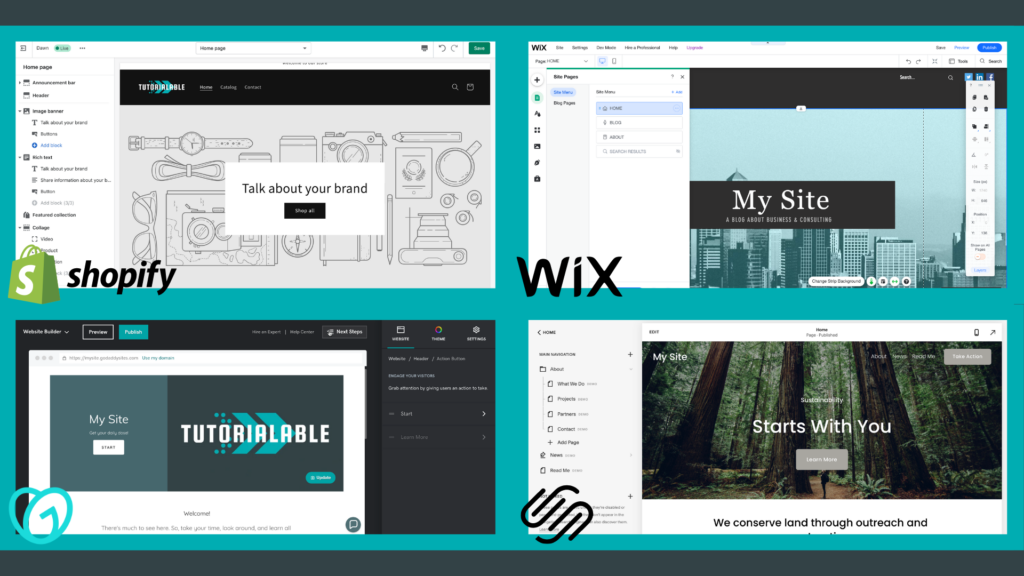
This shows what you would see when you started using 4 of the most popular all in one web builders out there.
- The top left is Shopify. They are an e-commerce platform, so they’re specifically for online stores.
- The top right is Wix. They’re a popular all purpose web builder. They’re a great choice for anyone using an all in one.
- The bottom left is GoDaddy. I actually started off with this one, but they’re not on the level of Wix in terms of popularity.
- The bottom right is SquareSpace. A lot of influencers promote them for e-commerce, but they are not as popular as Shopify which has a huge user base.
#2 You can use the WordPress web builder
WordPress is an extremely popular web builder. You do need to pay for hosting separately, but this is cheaper than an all in one builder and actually better for many purposes. There are millions of websites that use it on a daily basis. Creating a website on WordPress can be disorienting if you don’t know where to start. WordPress.org is completely free to use.
There are many online tutorials that show you how to create sites. In my experience they try to sell you on high cost themes before you get an understanding of the platform. They say it’s free, but in order to actually use the site you need to pay. Thankfully, I got comfortable using WordPress after spending some time trying it out. This helped me learn that you can make a beautiful website without paying a cent for the builder and themes themselves. The biggest benefit is that you can make multiple sites and only pay one price for hosting. I have guides on how to create full websites from start to finish with free themes for regular purposes and e-commerce.
Which is better?
This completely depends on what you want to make a website for, the number of sites you’ll want to have long term, (normally this is one), and how much you’re willing to learn.
Want to make on online store?
It’s not even a competition. Shopify is the best online store builder for anyone making their own website. This is for several reasons.
- Most companies natively connect to Shopify via their apps. This avoid massive issues of integrating your store across all of the platforms you want connected, (such as Facebook, Google Merchant Center, etc…).
- They have every store feature available that people have come to expect while shopping online built in, (and have apps to add even more).
- There are so many Shopify stores out there that people are actually used to buying from them. This makes them a lot more likely to be comfortable buying from you.
Want to make a blog?
You can choose Wix or WordPress. I recommend you use Wix if you don’t plan on making more than on website. Why?
- The pricing for Wix is very good for a single website.
- Your website will run extremely fast, (which is not a simple task on WordPress).
- The built in features, like Shopify, are very good. This will help your website by showing you’re a professional who is to be trusted.
- It’s a lot simpler than WordPress, (which is doable, but there’s no reason to go learn the skill when it won’t actually help you by making your site better).
Making multiple sites?
For online stores, you should still go to Shopify. For blogs and similar websites, It depends on the amount of effort you want to put into it. WordPress lets you share your processing power for your websites, (since a website is essentially run by computer processing power). This means that you’ll essentially get 2 sites for the price of one. This takes more time though, and it’s not a simple task to make a WordPress site as nice as a Wix one will be automatically.
What happened to the other 2 all in one web builders?
They’re just not as good. The pricing is very similar, but the features are either lacking or not up to par with these. I’ve personally used GoDaddy and needed to move to another builder due to limitations. Squarespace just seems too expensive for tools which are not special, (especially for stores).
I hope this has helped you in your decision making. I’m constantly adding new tutorials to further help you in your journey!